
Full Stack PPC & Analytics Case Study:
Tracking, Execution & Optimization
Built and analyzed a PPC campaign with end-to-end tracking using GA4 and GTM.
OverView
This project demonstrates how I designed tracking, executed a PPC campaign, and analyzed performance using GA4 and GTM.
Starting from no tracking setup, I built a measurement system to capture key user actions, validate data accuracy, and evaluate campaign performance.
The goal: build a data-driven marketing workflow
Launch → Track → Analyze → Optimize
To support this workflow, I built a data-driven PPC system that connects:
- Event tracking (GTM)
- Analytics (GA4)
- Campaign execution (Google Ads)
- Performance analysis and Optimization
Role: Digital Marketer (Analytics & Automation Focused)
Duration: Mar 2025 – Present
Tools & Stack:
Google Tag Manager · GA4 · Google Ads

Website Development & Setup
Built a WordPress website and marketing infrastructure from scratch without relying on templates or AI builders.
All tracking and marketing tools were implemented independently without relying on external developers.
- Website development (LP-based structure)
→ Built using WordPress (Gutenberg / Elementor) to allow fast updates and continuous optimization - Landing page structure (conversion-focused)
→ Designed a full conversion flow including Hero, value proposition, service explanation, social proof, and clear call-to-actions - Tracking & tool implementation (no developer dependency)
→ Implemented GA4, Google Tag Manager, and Google Ads directly within WordPress without relying on developers - SEO & technical setup
→ Applied keyword-focused structure (on-page SEO), FAQ schema (structured data), and page speed optimization
With full control over the system, I can quickly optimize landing pages based on performance data and directly update content, structure, and tracking without relying on external developers.
This allows me to use AI builders or templates for rapid development when needed, while maintaining the ability to independently refine, optimize, and update the website based on real performance data.
Initial Setup & Tracking Design
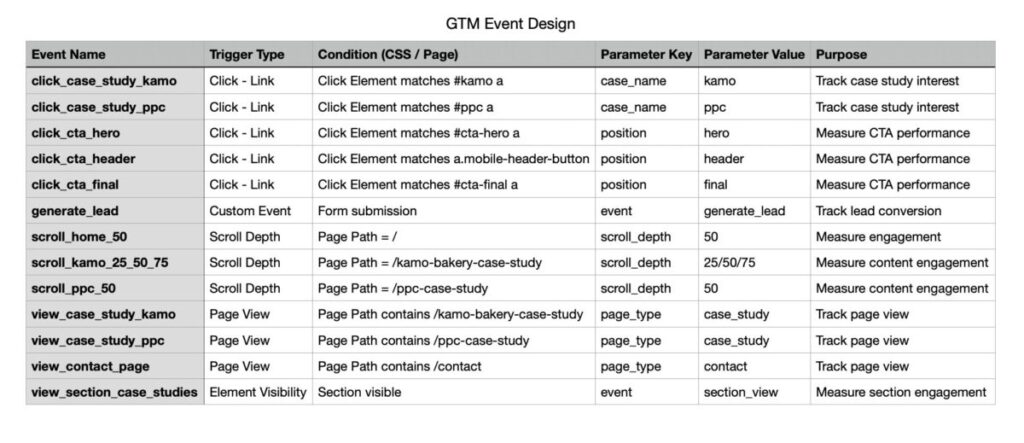
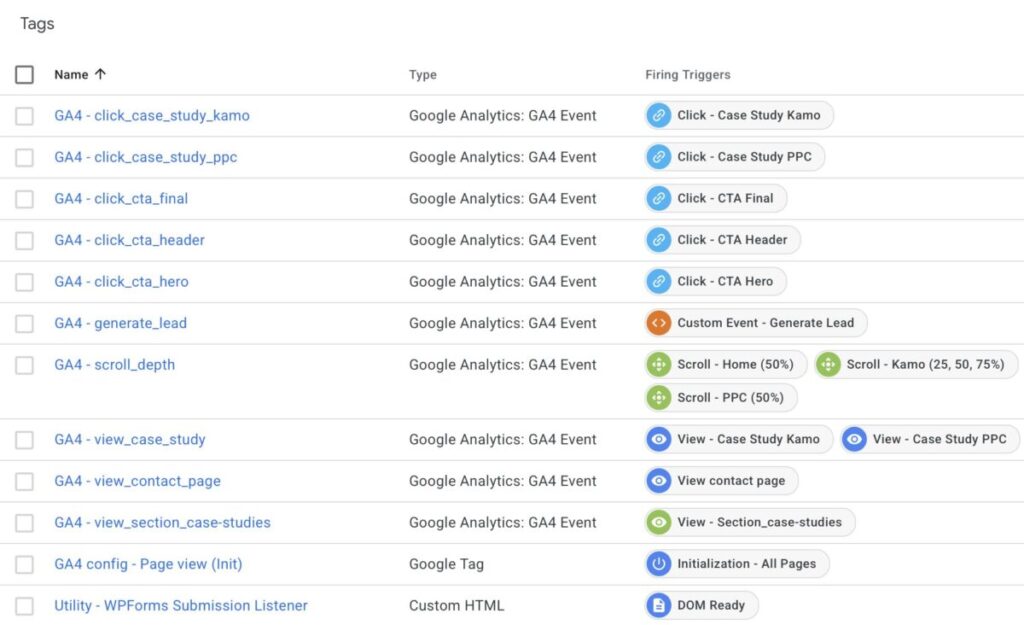
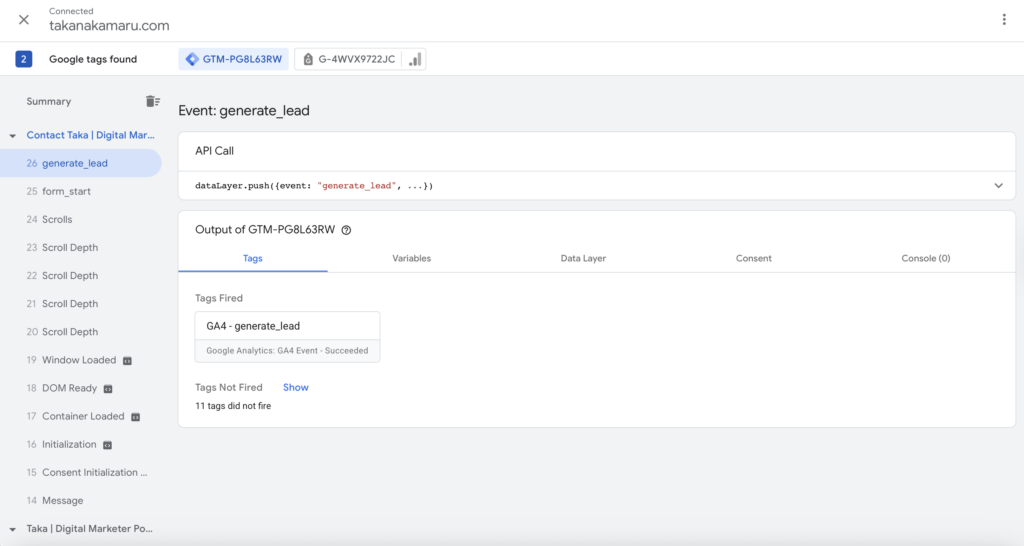
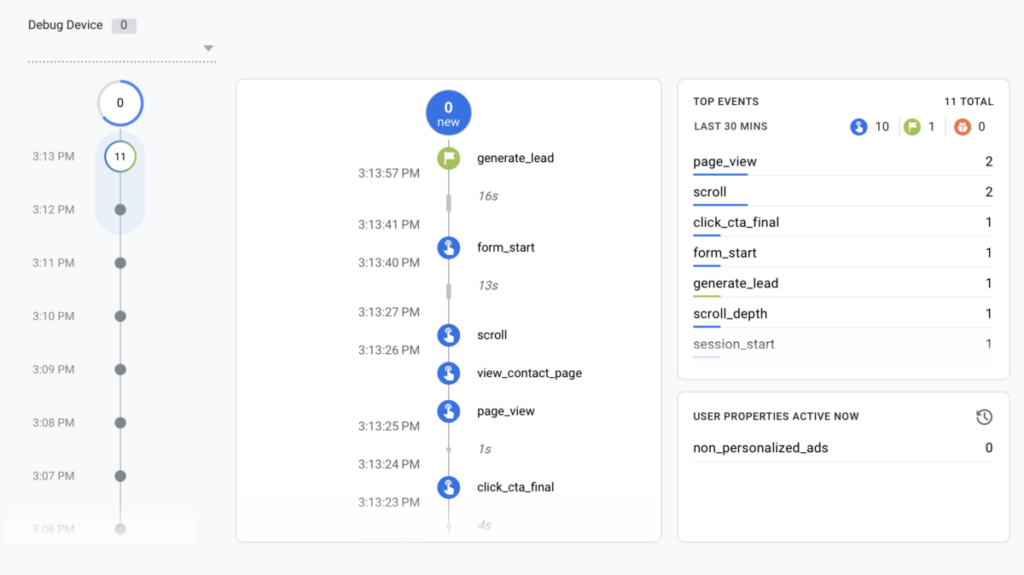
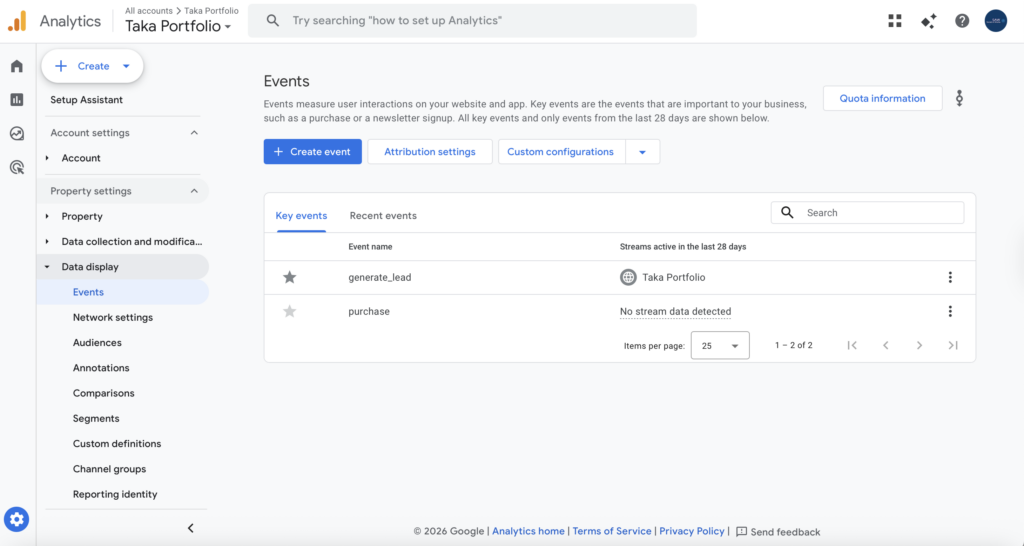
Designed a tracking system in Google Tag Manager to measure key user actions and ensure data accuracy before running campaigns.
Why These Event Tracking
To ensure meaningful performance analysis, events were designed to capture key user actions across the conversion funnel.
- CTA clicks (click_cta_)
→ Measure user intent and identify which placements drive engagement - Page views (view_)
→ Analyze user navigation and confirm page visits - Click vs Page View tracking
→ Distinguish between user intent (click) and actual page visits to enable accurate funnel analysis - Lead conversion (generate_lead)
→ Track primary conversion and evaluate campaign effectiveness - Scroll depth (scroll_)
→ Understand content engagement and identify drop-off points - Section visibility (view_section_)
→ Measure visibility and engagement with key content areas
These events enable a structured understanding of user behavior, from initial interaction to conversion.
PPC Campaign Execution
Strategy Overview
Structured the campaign around three intent-based segments to capture different stages of user intent:
- Hire intent (users actively looking to hire a marketer)
- Local service intent (businesses searching for marketing support)
- Portfolio intent (users evaluating skills and experience)
Keyword Strategy
Designed a keyword strategy focused on high-intent search queries within a limited budget.
Primarily used phrase match to balance control and reach.
Designed with flexibility for future optimization based on performance data.
Included long-tail keywords to improve traffic quality and reduce competition.
Included high-intent “hire” keywords to capture users actively searching for marketing professionals.
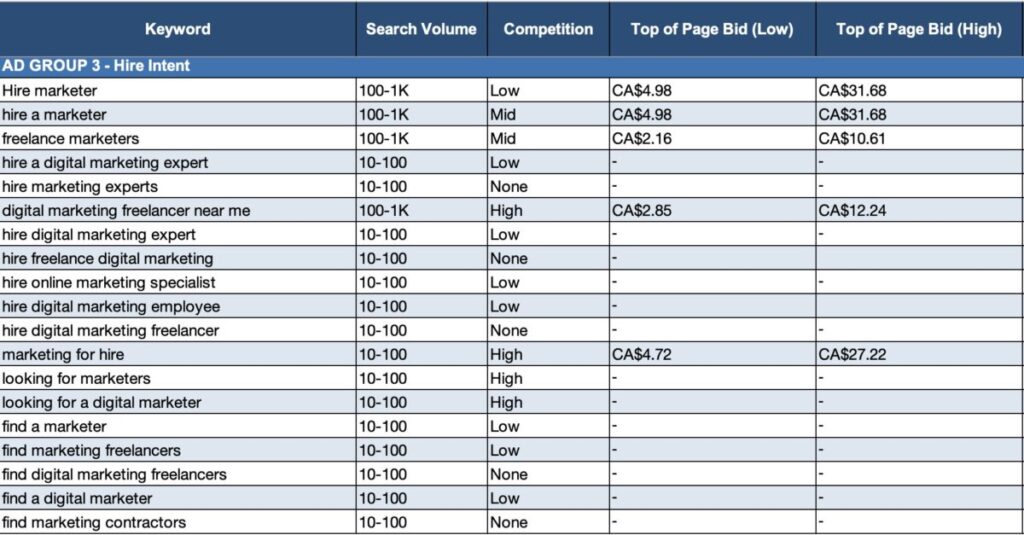
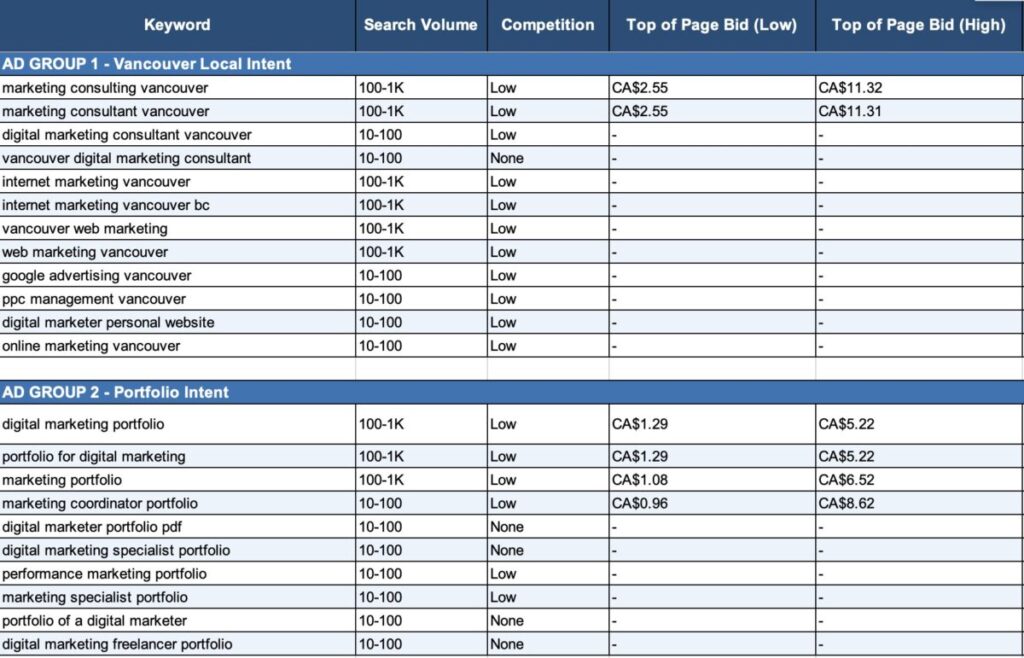
Separated keywords into 3 intent-based ad groups:
- High-intent “hire” keywords to capture users actively searching for marketing professionals.
- Local service intent (e.g., “digital marketer Vancouver”)→ Targets businesses searching for marketing support
- Portfolio intent (e.g., “digital marketing portfolio”)→ Captures users evaluating candidates and skills
This structure enables more precise targeting, messaging alignment, and performance analysis.
Ad Copy
Developed ad copy aligned with keyword intent and user search behavior, focusing on relevance, clarity, and conversion.
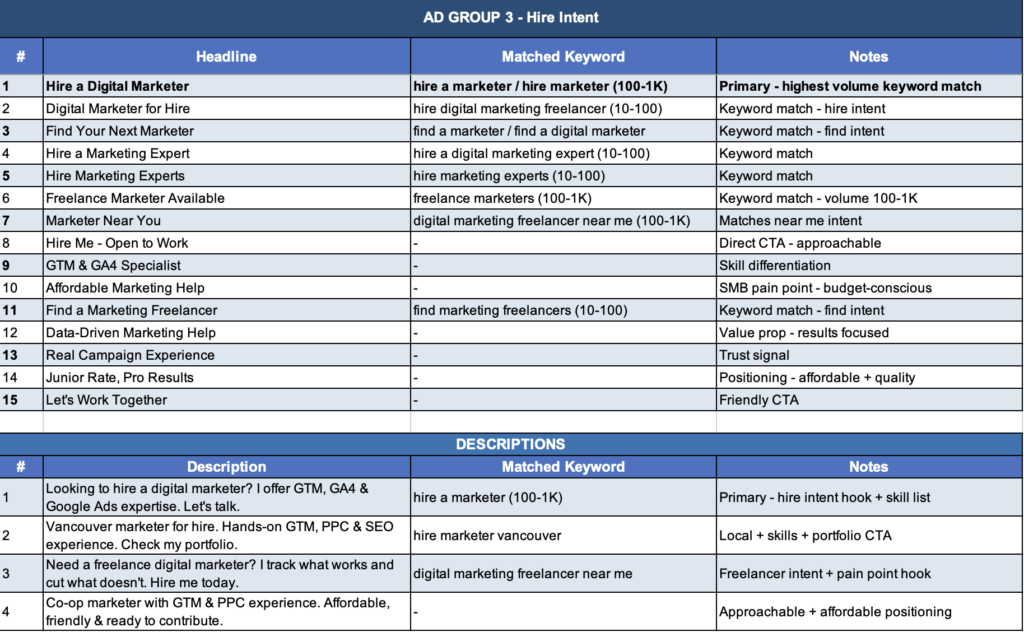
Hire Intent
Created ad copy targeting users with strong hiring intent, emphasizing availability, skills, and direct action.
Focused on clear hiring signals, strong CTAs, and value propositions to convert high-intent users.
Local Intent
Created ad copy targeting local search queries, emphasizing service availability, location relevance, and direct hiring intent.
Included location-based keywords and clear CTAs to attract businesses actively looking for marketing support.
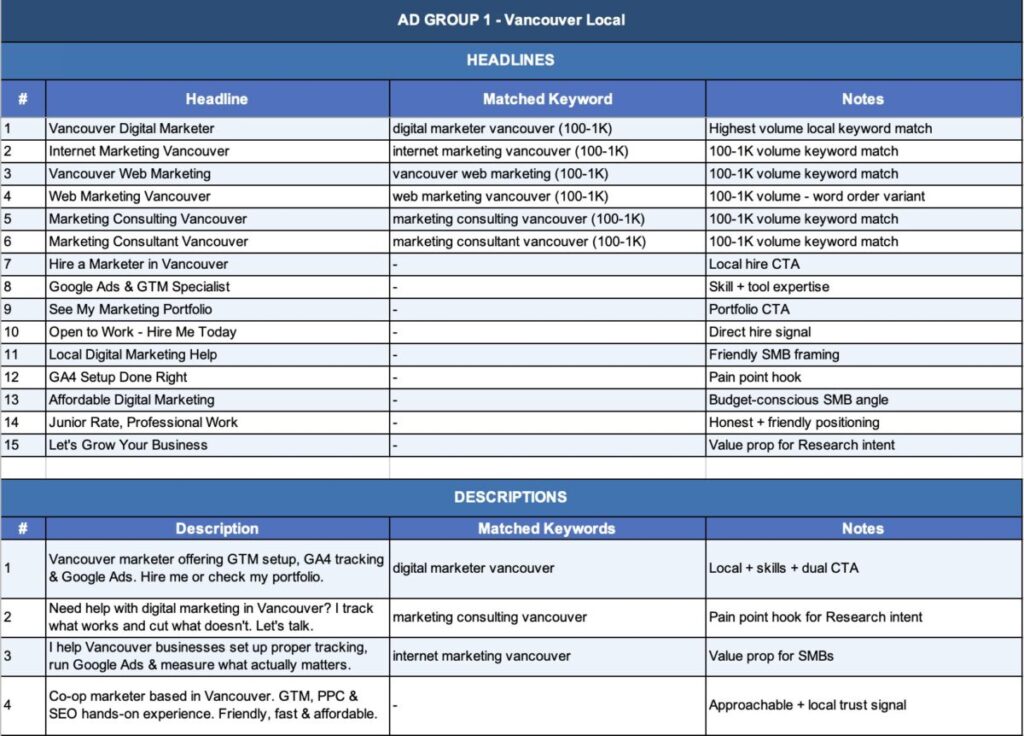
Portfolio Intent
Developed ad copy for users evaluating skills and experience, highlighting portfolio access, capabilities, and credibility.
Focused on showcasing practical experience and encouraging portfolio exploration.
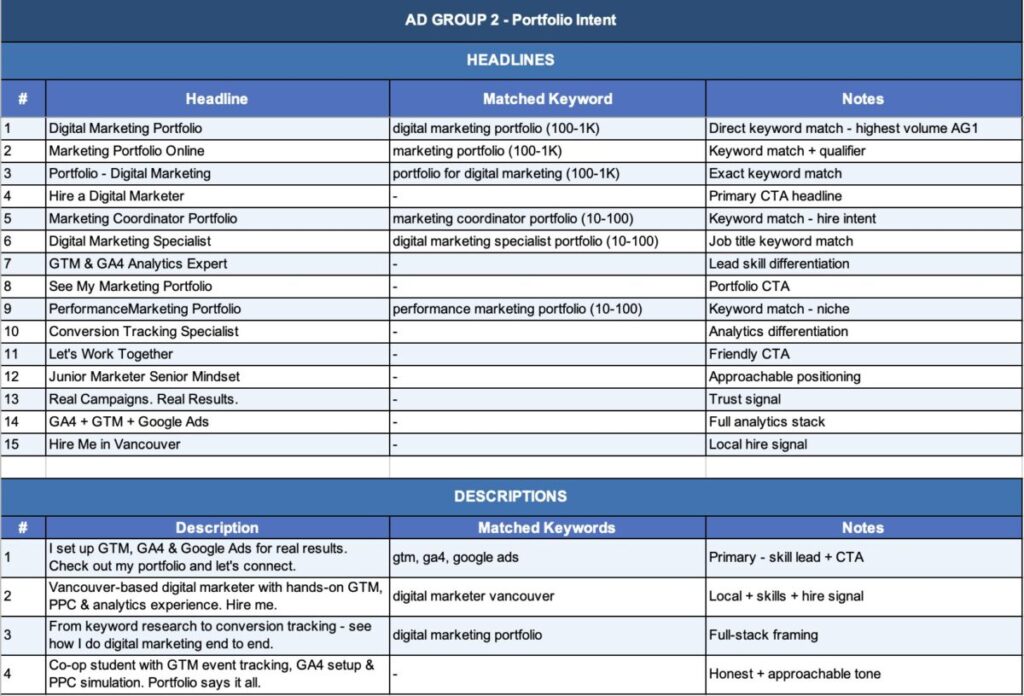
Aligned headlines with keywords to improve ad relevance and expected CTR.
Focused on matching user intent with messaging to improve click-through rate and traffic quality.
Campaign Setup
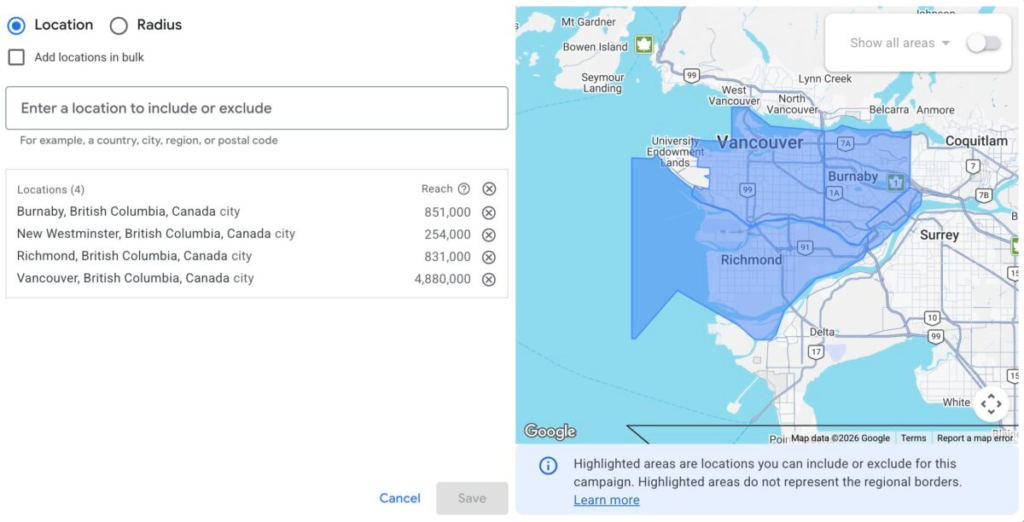
Managed budget allocation carefully to maintain cost efficiency under limited budget constraints.
Focused on targeting Vancouver and surrounding areas (Burnaby, Richmond, New Westminster) to reach relevant local businesses.
Narrowed geographic targeting to improve relevance and reduce wasted spend.
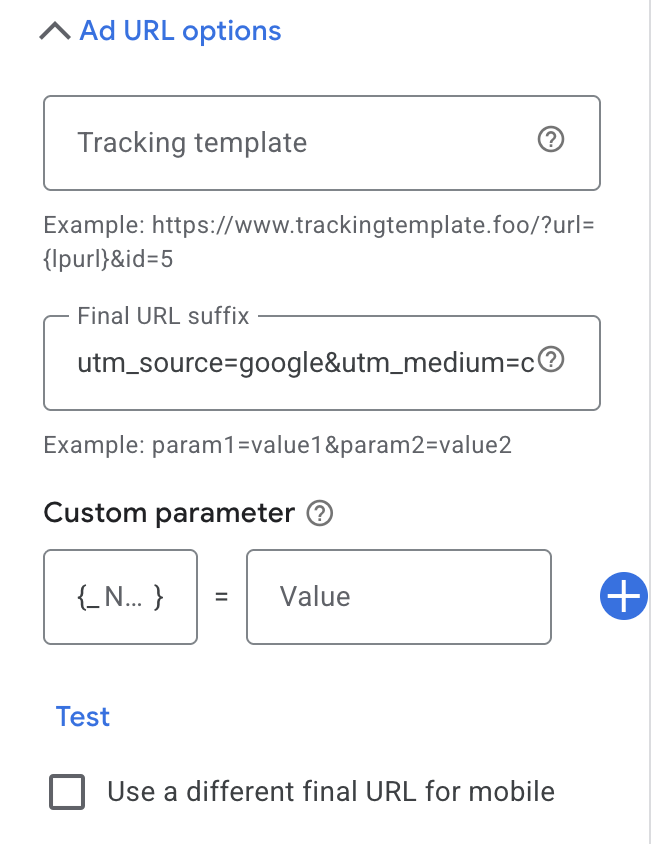
UTM Tracking
Implemented UTM parameters to track campaign performance and analyze traffic sources in GA4.
Captured key parameters such as campaign, keyword, match type, and device for detailed performance analysis.
Settings & Extensions
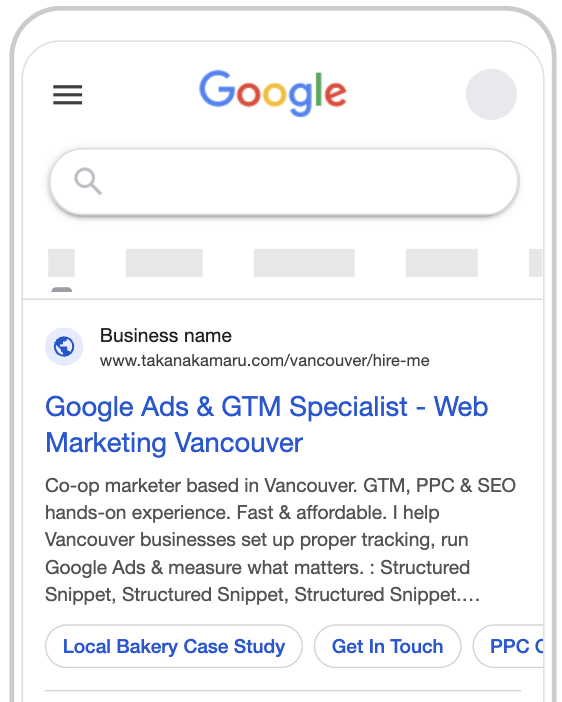
Configured ad extensions to improve visibility, provide additional information, and enhance ad performance.
- Sitelinks→ Increased ad visibility and provided direct access to key pages
- Callouts→ Highlighted key selling points to improve ad relevance and CTR
- Structured snippets→ Showcased specific services and capabilities to provide additional context
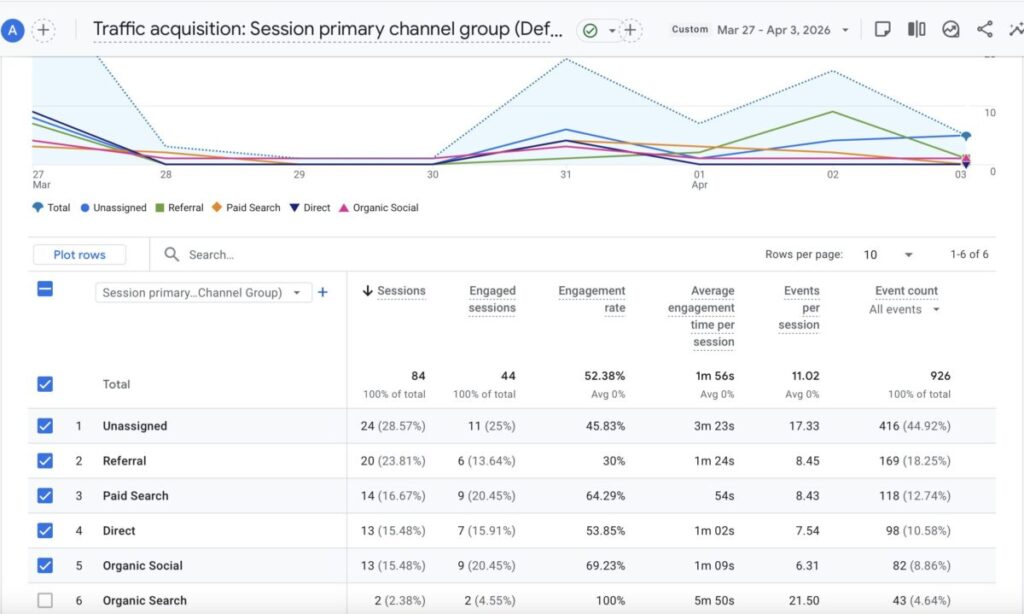
Analytics & Insights: Initial Performance
Before launch, GA4 and GTM were configured to track every visit and traffic source from day one. Over the first week, the campaign drove 14 paid search sessions alongside referral, direct, and social traffic, giving a clear picture of how each channel contributed.
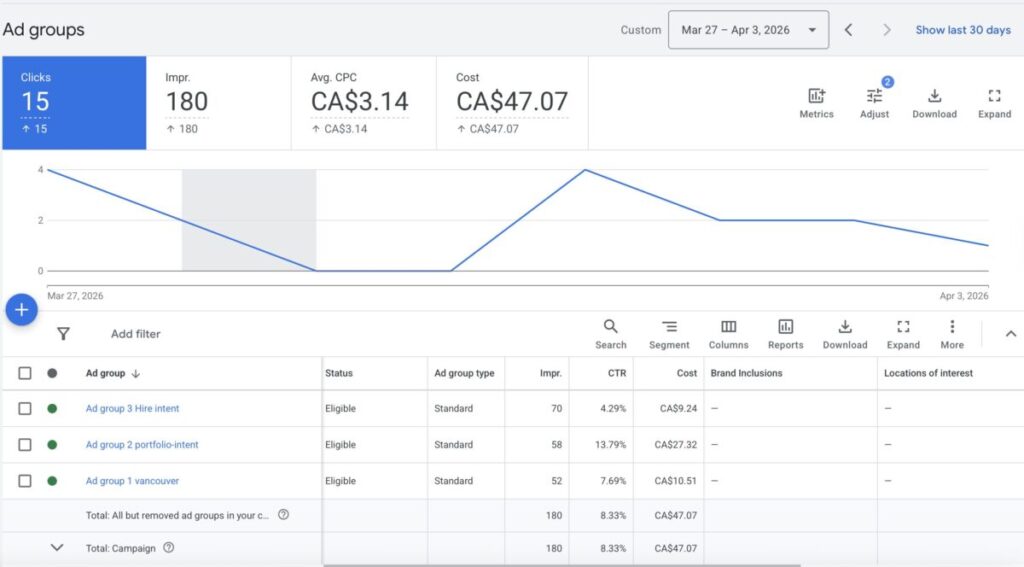
Initial Google Ads Performance
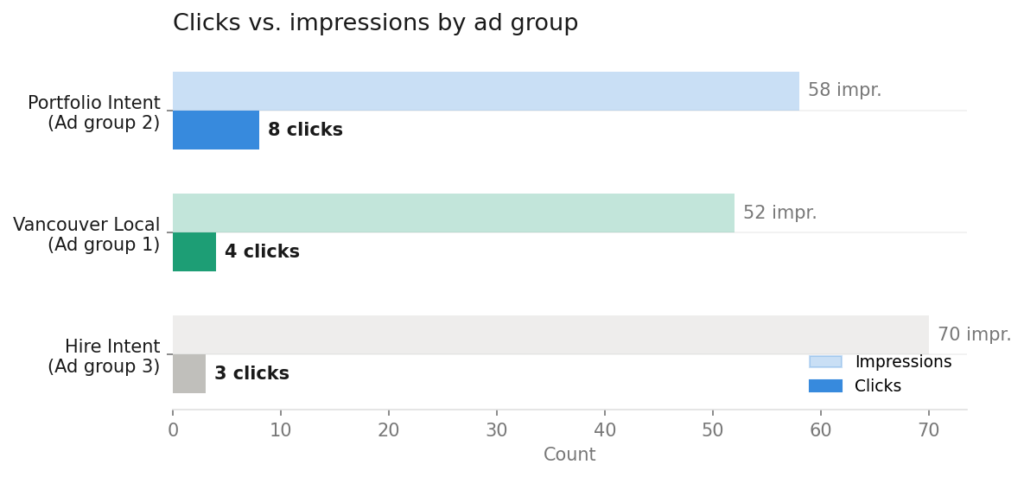
Ad group 3 (Hire Intent) was the primary conversion target, where the landing page and search intent were most directly aligned. Ad groups 1 and 2 were added as traffic drivers to collect data quickly within a short and limited campaign window.
Overall: 180 impressions, 15 clicks, and a click-through rate of 8.3%, nearly double the industry average of 2 to 5%.
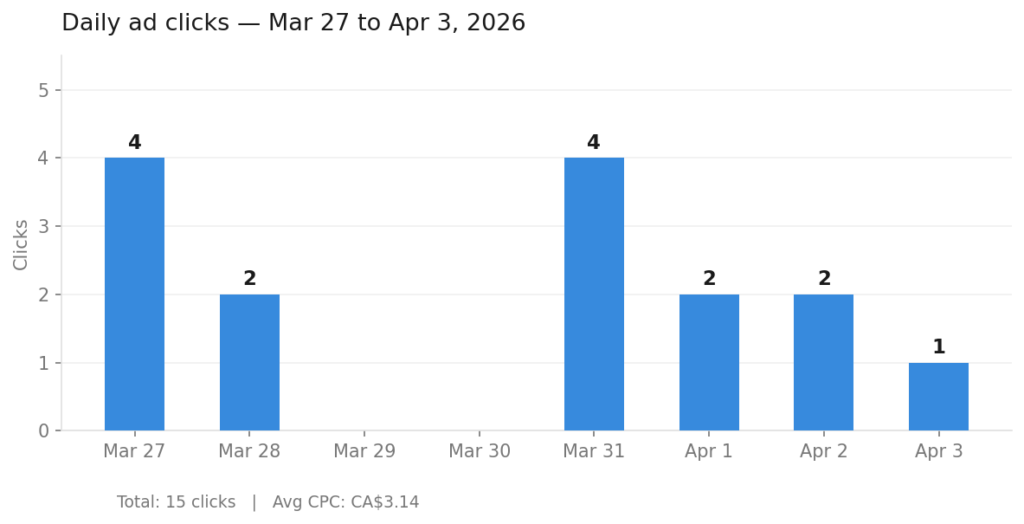
Clicks peaked on March 27 and March 31 with 4 each, consistent with mid-week professional search behavior. Zero-click days early in the campaign are expected while Google learns which searches are the best match.
Ad group 2 (Portfolio Intent) delivered the strongest results with 8 clicks from 58 impressions. Ad group 3 (Hire Intent) produced fewer clicks relative to impressions, which is normal for conversion-focused groups that need more data before the system learns who to prioritize.
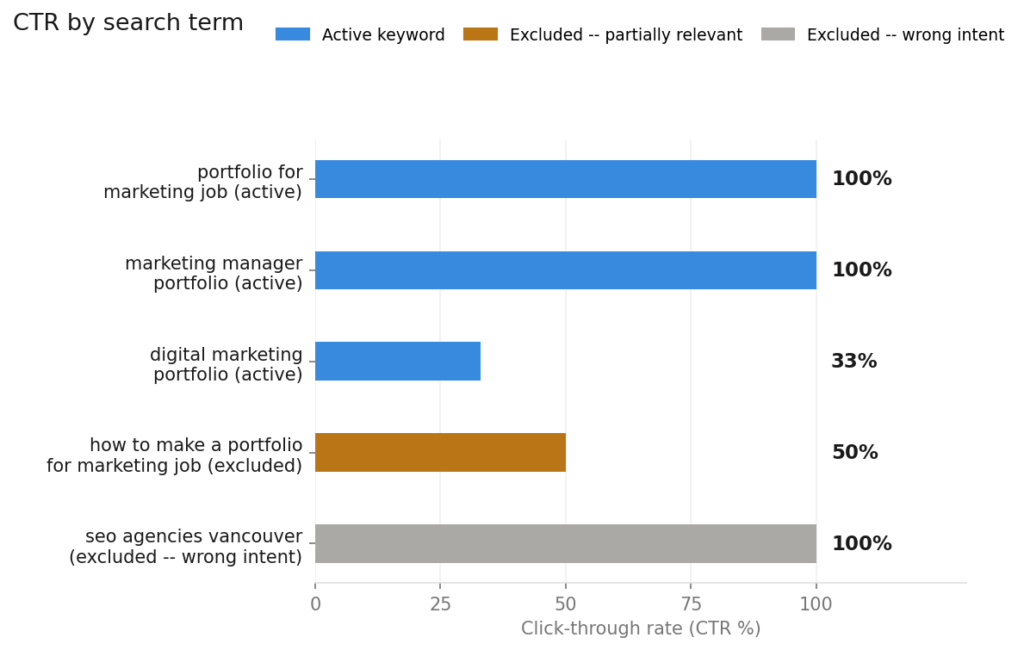
Three search terms drove clicks at rates between 33% and 100%, all from people actively looking for a marketer or portfolio. Two irrelevant terms were caught early and excluded, keeping the remaining budget on the right audience.
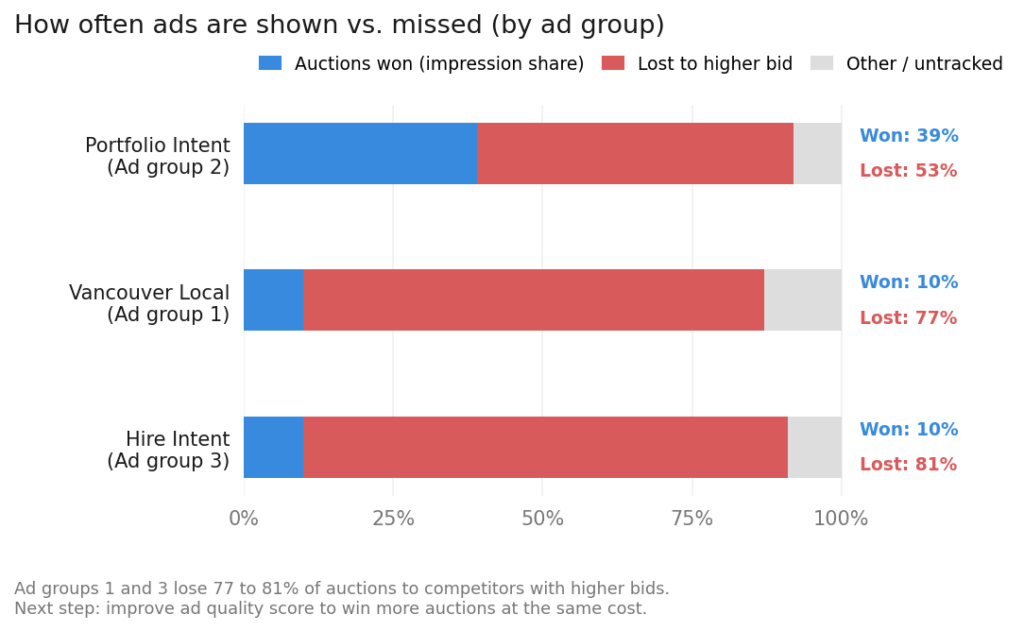
Ad groups 1 and 3 lost 77 to 81% of ad auctions to competitors with higher bids. The next step is improving ad quality score, which allows the ads to rank higher without increasing the bid amount.
Key takeaway
The campaign was structured with Hire Intent as the primary conversion target, supported by two traffic-driver groups to collect data quickly within a limited budget and timeline. With limited conversion data, Smart Bidding cannot optimize effectively and risks burning through budget during its learning phase. The next phase switches to manual CPC bidding to set higher bids on high-intent keywords and cap bids on weaker ones. For small businesses running campaigns on limited budgets, this keyword-level bid control is the most direct way to ensure every dollar goes toward the searches most likely to convert.
CRO Analysis (Funnel Insights)
Initial data shows that traffic and user activity are being generated across the website.
However, engagement-related events such as scroll and user interaction remain relatively limited, indicating that users are not fully engaging with the content.
This suggests that while traffic acquisition is functioning, user engagement and content effectiveness need improvement.
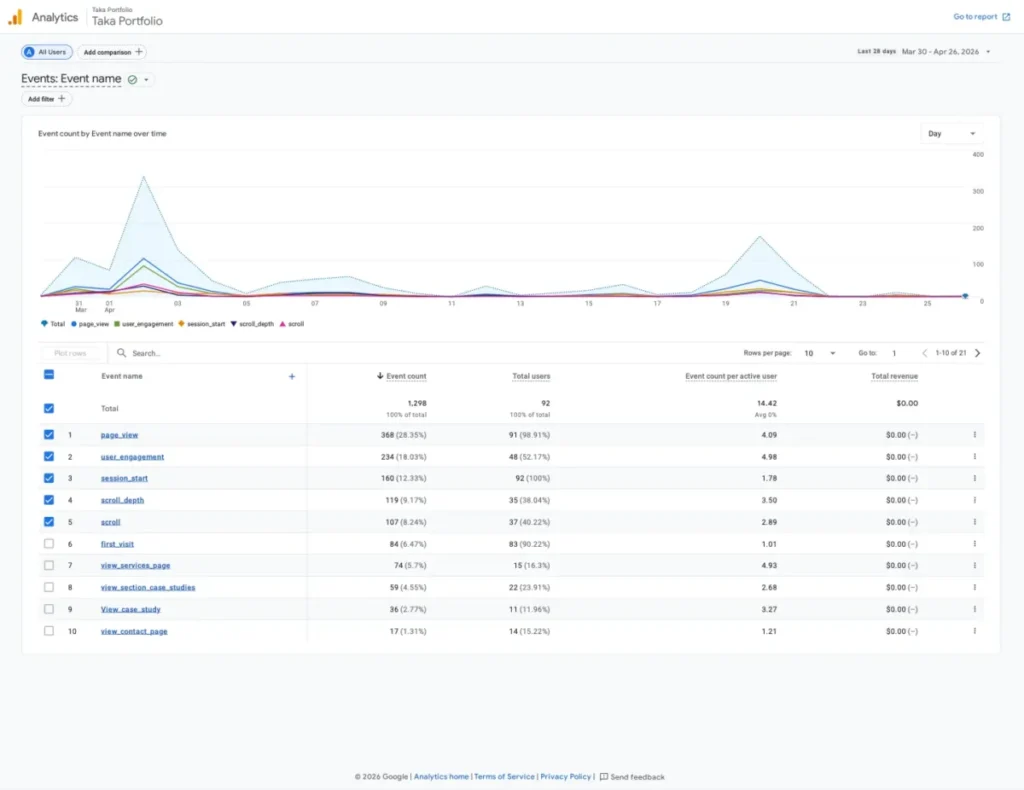
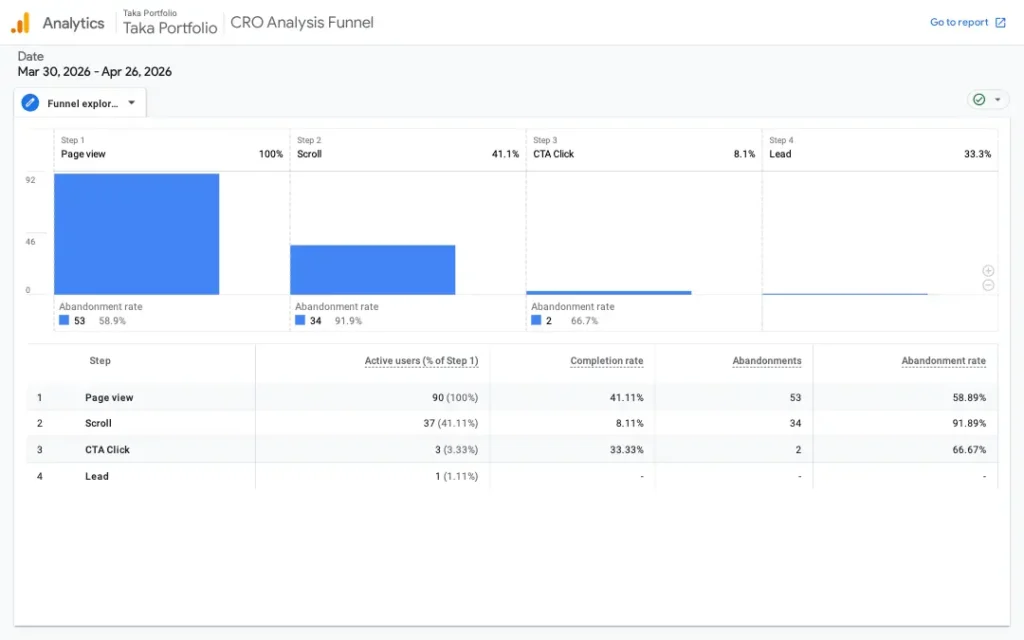
Funnel analysis reveals a significant drop-off across user interactions.
While 100% of users reach the page view stage, only 41% scroll, and just 8% proceed to click the CTA.
This indicates that users are not sufficiently engaged or guided toward taking action.
The main bottleneck appears before the CTA interaction, suggesting the need to improve content visibility, messaging clarity, and CTA placement.
Optimization Strategy
Intro
Based on initial performance data, several optimization opportunities were identified across the campaign and landing page.
Key Optimization Areas
Keyword Optimization
- refine intent
- remove irrelevant traffic
- prioritize high-intent keywords
Landing Page Optimization (CRO)
- improve above-the-fold clarity
- strengthen value proposition
- optimize CTA placement
Bidding Strategy
- consider shifting to Manual CPC
- allocate budget toward high-performing keywords
Data & Testing
- collect more data
- validate assumptions
- continuously refine performance
Implementation in Progress…
Closing
These optimizations aim to improve traffic quality, user engagement, and overall conversion performance.
Explore more data-driven growth case studies